Disclaimer: ChatGPT is a helpful AI tool, but it does not guarantee success, expertise, or professional results. Always verify important information from trusted sources before acting on it.
Introduction
Artificial Intelligence tools have become part of everyday life. Therefore, knowing how to use them well gives you a real advantage. ChatGPT is one of the most widely used AI tools available today. It helps people write, research, learn, and solve problems quickly.
However, many beginners do not get the best results from it. Often, the issue is not the tool itself. Instead, it is how people interact with it. This guide teaches you how to use ChatGPT efficiently so you can save time and work smarter.
Whether you are a student, professional, researcher, or content creator, this guide is for you.
What Is ChatGPT?
ChatGPT is an AI-powered chatbot developed by OpenAI. In simple terms, it is a computer program that understands and generates human-like text. You type a question or instruction, and it responds instantly.
It is used across many fields, including:
-
- Students — for summarizing topics, explaining concepts, and drafting essays
-
- Professionals — for writing emails, reports, and presentations
-
- Researchers — for exploring ideas, finding patterns, and drafting literature
-
- Businesses — for customer support scripts, content, and planning
-
- Content creators — for blog posts, scripts, captions, and brainstorming
In addition, ChatGPT is available in both free and paid versions. Therefore, it is accessible to almost anyone with an internet connection.
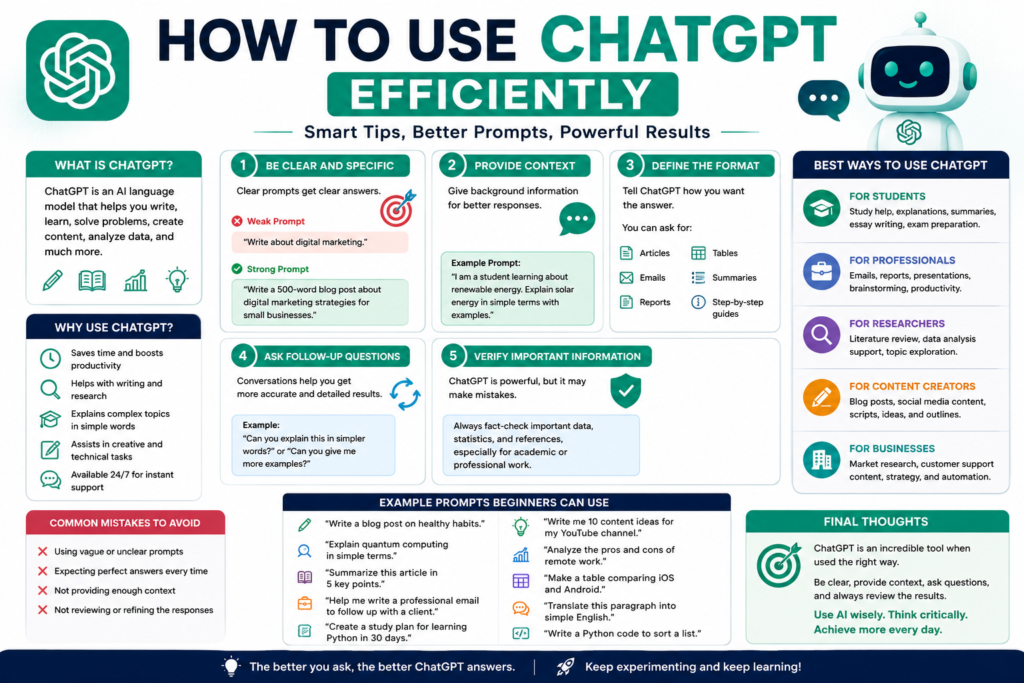
Why Prompting Matters
A prompt is simply the instruction or question you type into ChatGPT. Think of it as giving directions to a very capable assistant. The clearer your directions, the better the result.
For example, asking “Tell me about marketing” is too broad. However, asking “Explain digital marketing strategies for small businesses in simple terms” gives ChatGPT much more to work with. Therefore, learning to write good prompts is the single most important ChatGPT skill for beginners.
Step 1: Be Clear and Specific
Vague prompts produce vague answers. Therefore, always tell ChatGPT exactly what you need.
| Weak Prompt | Strong Prompt |
|---|---|
| Write something about health. | Write a 200-word blog intro about the benefits of morning exercise for beginners. |
| Help me with my email. | Write a professional email to my client apologizing for a delayed project delivery. |
| Tell me about AI. | Explain artificial intelligence tools in simple language for a complete beginner. |
First, decide what you want. Next, put that goal clearly into your prompt. The difference in results is immediate.
Step 2: Provide Context
Context is background information that helps ChatGPT understand your situation. Without it, responses can be too general to be useful.
For example, instead of asking “How do I prepare for an interview?”, try:
“I have a job interview for a junior data analyst role at a tech startup. I have no work experience. How should I prepare?”
In addition, you can tell ChatGPT who you are. For instance, “I am a final-year computer science student” helps it adjust the complexity and tone of the response. Therefore, always add relevant context before asking your main question.
Step 3: Define the Desired Format
ChatGPT can present information in many formats. However, it will not always choose the right one unless you ask. Therefore, always specify the format you need.
You can request:
-
- Articles — “Write a 500-word article on climate change for teenagers.”
-
- Emails — “Draft a follow-up email after a business meeting.”
-
- Reports — “Summarize the main causes of inflation in a short report.”
-
- Tables — “Create a comparison table of Python vs JavaScript for beginners.”
-
- Summaries — “Summarize the following text in three bullet points.”
Finally, if the format is still not right, simply ask ChatGPT to adjust it.
Step 4: Ask Follow-Up Questions
ChatGPT works as a conversation, not just a single question. Therefore, you can build on each response to get better results.
For example:
-
- First ask: “Give me five blog post ideas about healthy eating.”
-
- Next say: “Expand on idea number three with a full outline.”
-
- Then add: “Now write the introduction for that blog post in a friendly tone.”
In addition, you can ask ChatGPT to revise its own response. Simply say, “Make this shorter,” or “Rewrite this in a more formal tone.” Each follow-up question sharpens the output.
Step 5: Verify Important Information
ChatGPT is powerful, but it is not perfect. Sometimes it produces responses that sound confident but contain errors. Therefore, always review AI-generated content carefully.
-
- For research: Cross-check facts with academic sources or verified publications.
-
- For professional work: Have a qualified person review any critical documents.
-
- For health or legal matters: Always consult a licensed professional.
In addition, ChatGPT’s training data has a knowledge cutoff. Therefore, it may not have the latest information on recent events or new developments.
Best Ways to Use ChatGPT
For Students
-
- Summarize textbook chapters quickly
-
- Get step-by-step explanations for difficult concepts
-
- Generate essay outlines or draft introductions
-
- Create study flashcards or quiz questions
For Professionals
-
- Draft emails, memos, and reports faster
-
- Prepare meeting agendas and action plans
-
- Research industry topics and summarize findings
-
- Polish documents with tone and style adjustments
For Researchers
-
- Brainstorm research questions and hypotheses
-
- Summarize academic abstracts
-
- Identify gaps in existing literature
-
- Organize notes and draft methodology sections
For Content Creators
-
- Generate blog post ideas and outlines
-
- Write social media captions and video scripts
-
- Repurpose content across different formats
-
- Overcome writer’s block with quick drafts
For Businesses
-
- Create customer service response templates
-
- Draft product descriptions and marketing copy
-
- Summarize meeting notes and reports
-
- Plan content calendars and campaign ideas
Common Mistakes to Avoid
Many beginners make the same errors when starting out. However, these are easy to fix once you know them.
-
- Vague prompts — Always be specific about what you need and why.
-
- Blindly trusting responses — Always verify important facts from reliable sources.
-
- Lack of context — Include your background, role, or purpose in the prompt.
-
- Ignoring revisions — Ask ChatGPT to improve, shorten, or rewrite responses as needed.
-
- Using it for one-shot tasks only — Remember that conversations produce better results than single questions.
Example Prompts Beginners Can Use
Here are 10 ready-to-use prompts across different areas:
Writing
-
- “Write a professional cover letter for a marketing assistant role. I have two years of social media experience.”
-
- “Rewrite this paragraph to sound more formal and concise: [paste your text]”
Research 3. “List five reliable sources I can use to research the impact of social media on mental health.” 4. “Explain the pros and cons of renewable energy in simple language.”
Learning 5. “Explain machine learning to me as if I am a complete beginner with no technical background.” 6. “Create 10 multiple-choice quiz questions on the topic of basic economics.”
Productivity 7. “Help me create a weekly study schedule for a student preparing for final exams in three subjects.” 8. “Summarize the following meeting notes into three key action points: [paste notes]”
Content Creation 9. “Give me 10 blog post title ideas about AI productivity tools for small business owners.” 10. “Write a 150-word Instagram caption for a tech brand launching a new smartphone.”
Final Thoughts
Learning how to use ChatGPT efficiently does not require a technical background. In fact, it only requires practice, clear thinking, and good prompting habits. First, start with simple tasks. Next, build your skills by experimenting with different prompt styles.
Also, remember that ChatGPT is a tool, not a replacement for human judgment. Therefore, always review its outputs and use them as a starting point, not a final product.
Finally, the key lessons from this guide are:
-
- Be specific in every prompt you write.
-
- Add context to get more relevant responses.
-
- Define the format so the output fits your needs.
-
- Use follow-up questions to refine and improve results.
-
- Always verify important information from trusted sources.
Used responsibly, ChatGPT can genuinely support your work, studies, and creativity. Therefore, start applying these ChatGPT tips today and discover what AI productivity can look like for you.
Published on Inteidea | Category: AI Tools & Tutorials | Reading Time: ~6 minutes